




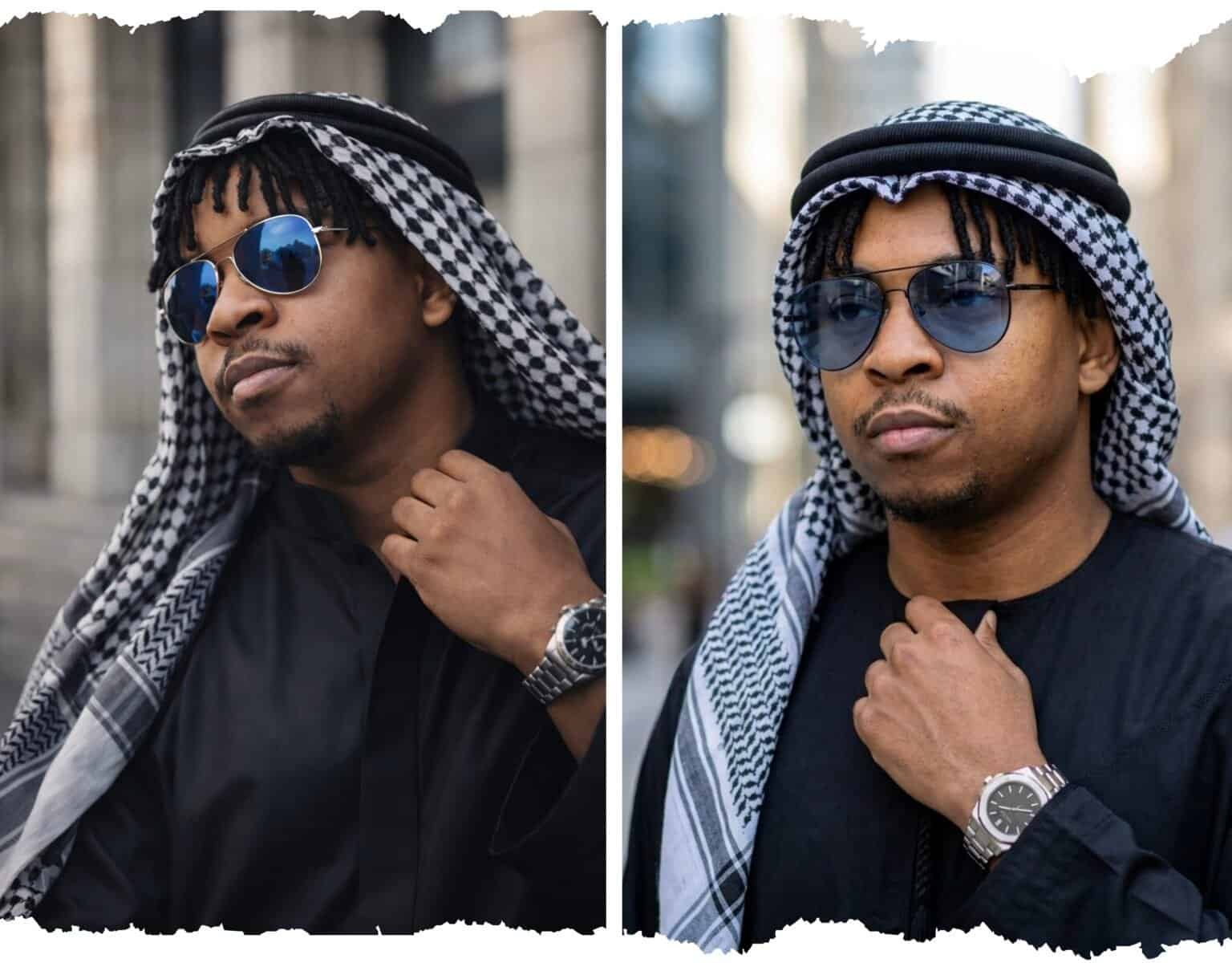
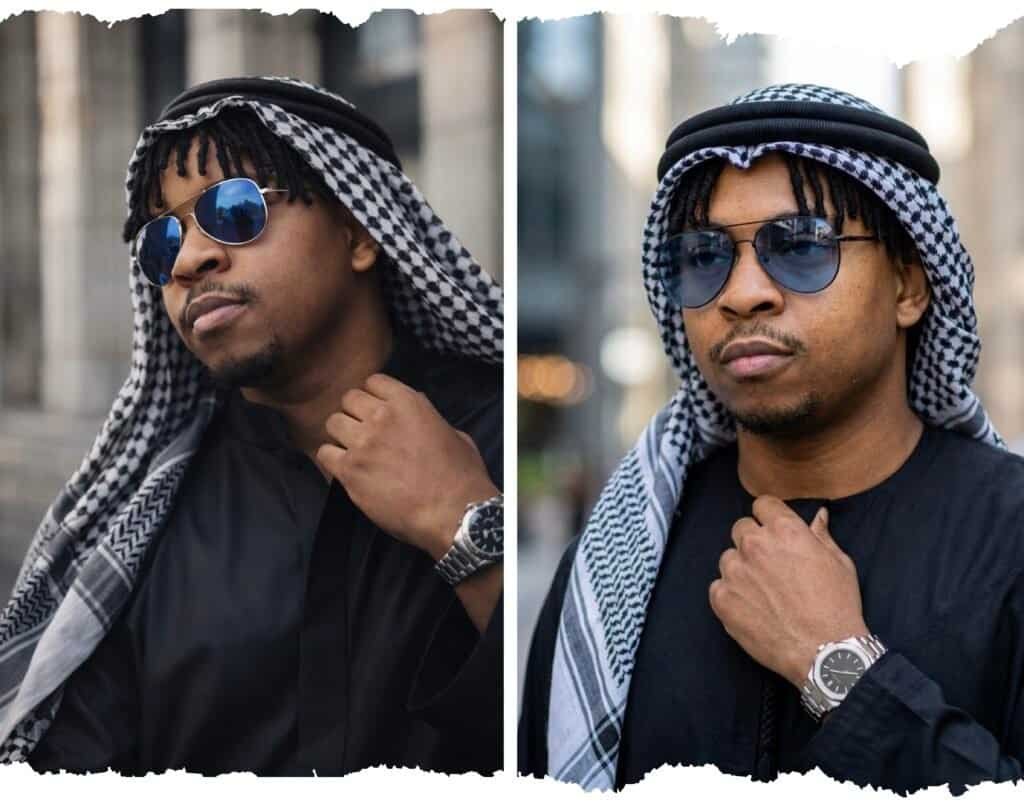
This prompt turns a photo of your face into an ultra-realistic cinematic portrait of you wearing traditional Arabian attire. The result features a black jalabiya robe, a black-and-white keffiyeh headscarf secured with an agal headband, aviator sunglasses, and a luxury watch.
The output looks like a professional fashion editorial photograph with soft natural lighting, blurred urban architecture in the background, and sharp detail on the face. Your facial features are preserved from your uploaded photo, so the result looks like you, not a generic AI-generated face.
Prompt Credit
This prompt was originally created by Hay Why, a creative mind I follow on Facebook who consistently shares impressive AI image work. I came across this prompt on his page, tested it myself across multiple tools, and was impressed enough to feature it here with full credit.
The editorial breakdown, testing observations, and customisation tips below are my own, but the original prompt belongs to him. Give his page a follow if you want to see more creative AI work.
AI Prompt Details
| Field | Details |
| Prompt Type | Image Generation |
| Best Tool | ChatGPT (free tier) |
| Also Works On | Gemini (free tier, with slightly lower quality) |
| Difficulty | Beginner-friendly (copy and paste) |
| Customisation | Clothing, background, accessories, pose, and aspect ratio can all be swapped |
| Requires | A reference photo of your face uploaded with the prompt |
The Full Prompt
Use my uploaded photo as the face reference and preserve my exact facial identity — the same facial structure, jawline, nose shape, lips, eye shape, skin tone, beard pattern, hairline, and hairstyle exactly as they appear in my photo. My face must remain fully recognizable and masculine with no alterations or stylization.
Create an ultra-realistic cinematic portrait matching the exact composition and mood of the reference image. The subject is shown in a close-up chest-up portrait, slightly turned to the side with his head tilted slightly upward, looking confidently into the distance with a calm expression.
He is wearing a black jalabiya (traditional robe) with smooth flowing fabric. Draped over the head and shoulders is a black-and-white patterned keffiyeh scarf, neatly arranged and secured with a black agal (traditional circular headband).
Accessories: reflective blue-tinted aviator sunglasses. On the wrist is a luxury stainless-steel watch with a metal bracelet and dark watch face.
Pose: the right hand gently holds the collar area of the robe near the neck, as if adjusting it. The other arm remains relaxed out of frame.
Lighting: soft natural outdoor lighting illuminating the face from the front-side angle, creating gentle shadows and strong facial definition.
Background: blurred urban architecture with tall stone or concrete structures, shallow depth of field with smooth cinematic bokeh, subject sharply in focus.
Camera style: professional portrait photography, 85mm lens look, shallow depth of field, ultra-detailed skin texture, cinematic color grading, high dynamic range, fashion editorial photography.
Aspect ratio: vertical portrait (4:5), extremely realistic, sharp focus on the face.
Copy this prompt and paste it directly into ChatGPT. Make sure to upload your reference photo before sending the prompt. The photo and the prompt should be sent together in the same message for best results.
See the Result
Here is what this prompt produced when I tested it on both tools using the free tier. The same reference photo and the same prompt were used for each.
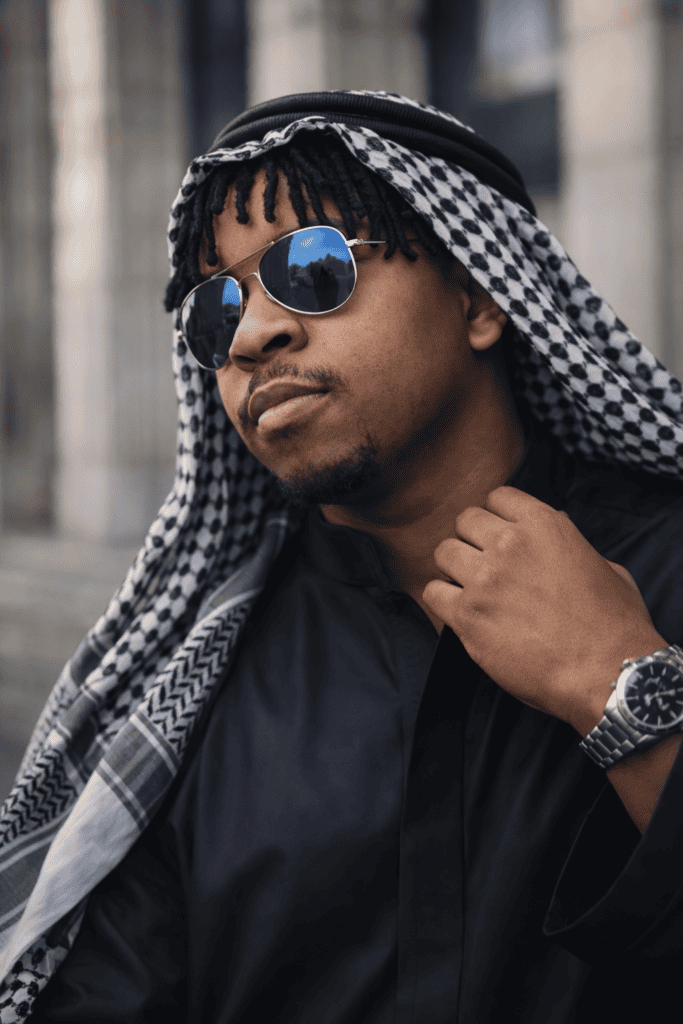
ChatGPT (free tier):
Gemini (free tier):
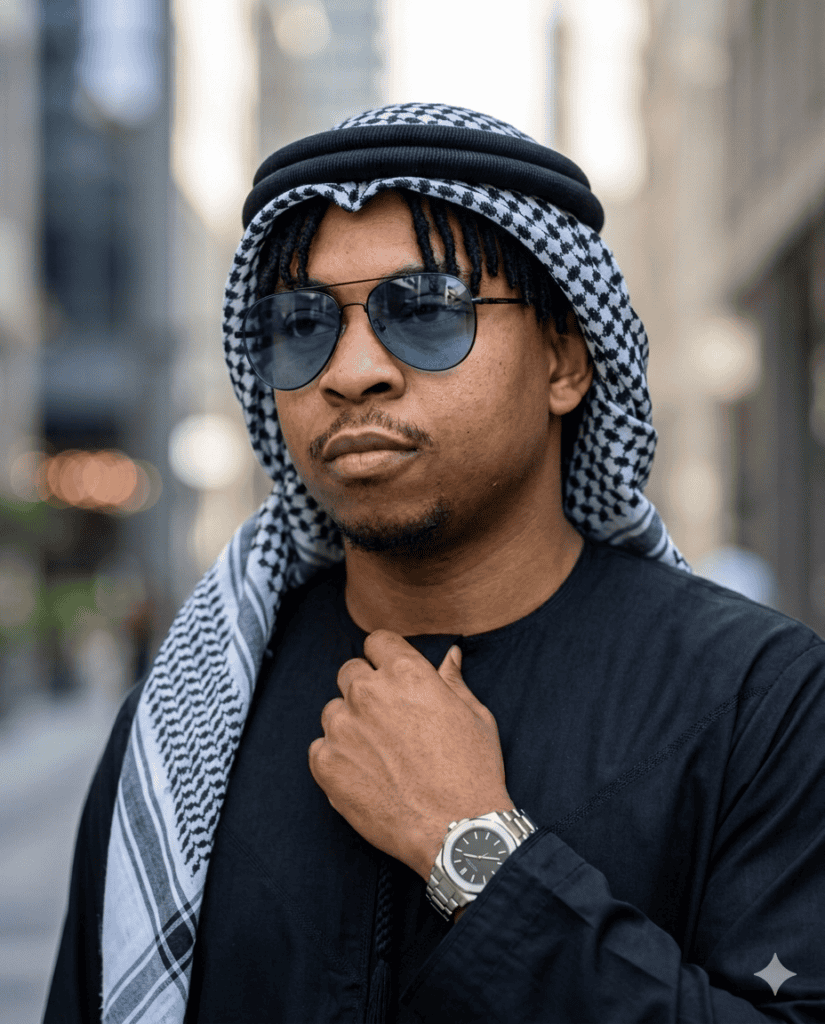
The difference speaks for itself. ChatGPT delivered a sharper, more cinematic result with stronger facial preservation and more natural lighting.
Gemini produced a reasonable output but lacked the fine detail and editorial polish that make the ChatGPT version stand out.
Why This Prompt Works
- Locking in your facial identity. The opening paragraph lists every specific facial feature (jawline, nose shape, lips, eye shape, skin tone, beard pattern, hairline) and tells the AI to preserve them exactly. Without this, AI image generators tend to “improve” or stylise your face, which means you end up looking like a polished stranger rather than yourself. Explicitly telling the AI “no alterations or stylization” acts as a constraint that prevents it from taking creative liberties with your likeness.
- Using camera language to trigger photorealism. Terms like “85mm lens look”, “shallow depth of field”, and “cinematic color grading” are not random jargon. They reference real photography techniques that AI models have been trained on millions of examples of. An 85mm lens produces a natural, flattering compression on portraits with a blurred background. By naming this in the prompt, you are telling the AI to replicate that exact look rather than producing a flat, generic image.
- Directing the lighting like a photographer would. “Soft natural outdoor lighting illuminating the face from the front-side angle, creating gentle shadows” gives the AI a specific lighting setup to work from. This creates depth and dimension on the face. Without lighting instructions, most AI generators default to flat, even lighting which makes the image look artificial.
- Describing every visual element in detail. The prompt covers clothing, fabric texture, accessories, pose, hand position, background, and composition. Each detail reduces the AI’s guesswork. The more precisely you describe what you want, the less the AI has to improvise, and improvisation is where AI images tend to go wrong.
- Setting the aspect ratio last. Ending with “vertical portrait (4:5)” ensures the composition is framed correctly for the style of image you want. Without this, the AI may default to a square or landscape format that cuts off the composition or adds unwanted space.
Tools I Tested This Prompt On
ChatGPT (free tier): The clear winner. ChatGPT produced an outstanding cinematic capture with a natural, confident pose that matched the prompt closely. Facial preservation from the reference photo was strong, the clothing details were well rendered, and the overall image had the polished, editorial quality the prompt aims for. The lighting and background blur looked convincingly photographic.
Gemini (free tier): The result was alright but noticeably behind ChatGPT. The overall composition was there, but the level of cinematic polish and fine detail on the face and fabric did not match what ChatGPT delivered. If ChatGPT is not available to you, Gemini will get you a decent result, but it is not the first choice for this particular prompt.
Verdict: ChatGPT on the free tier is the clear recommendation here. The fact that you do not need a paid plan to get this quality of output makes it an easy choice.
How to Customise This Prompt
Change the outfit: Replace “black jalabiya” and “keffiyeh scarf” with any attire you want. Try “charcoal three-piece suit with a burgundy tie” or “white linen shirt with rolled sleeves” for a completely different look. Keep the fabric descriptions (“smooth flowing fabric”) and adjust them to match, such as “crisp tailored wool.”
Change the background: Replace “blurred urban architecture with tall stone or concrete structures” with any setting. “Golden desert dunes at sunset”, “modern glass skyline at night”, or “lush green garden with soft natural light” all work well.
Change the accessories: Swap “blue-tinted aviator sunglasses” for “round gold-framed glasses” or remove them entirely. Replace the watch description with any wrist accessory or remove it if you prefer a cleaner look.
Create a female portrait: Change “masculine” to “feminine” in the opening identity paragraph. Replace the clothing description with attire of your choice, such as “a flowing black abaya with gold embroidery and a matching hijab.” Adjust any gender-specific details like “beard pattern” to match the subject.
Change the pose: Replace the current pose description with your own. “Arms crossed confidently, looking directly at the camera” or “leaning against a stone wall with one hand in the pocket” both give the AI clear direction.
A Note on AI-Generated Images
Recommended tool: I found that ChatGPT produced the best result for this specific prompt, even on the free tier. That does not mean it will always be the best tool for every prompt. Different AI tools have different strengths, and results can vary depending on the version, server load, and time of generation.
Output variability: AI image generation is not perfectly consistent. Running the same prompt twice can produce slightly different results. If your first output does not match what you expected, try generating again or make small adjustments. Generating two to three versions and picking the best one is standard practice.
Accuracy and likeness: AI-generated images are approximations. Even with detailed facial identity instructions, the AI may soften, slightly alter, or stylise certain features. The result will look like you, but it may not be a perfect photographic match. Always review the output carefully, and do not rely on AI-generated portraits for anything that requires exact likeness accuracy (such as official identification).
Usage: Before using AI-generated images commercially or publicly, check the terms of service of the tool you used. Policies on ownership, usage rights, and content restrictions vary between platforms. ChatGPT and Gemini have different terms regarding commercial use of generated images.
Frequently Asked Questions About This Prompt
Does this prompt work on the free tier of ChatGPT?
Yes. I tested this prompt on the free tier of ChatGPT and it produced an outstanding result. You do not need ChatGPT Plus or any paid plan to use it. Just make sure you upload your reference photo in the same message as the prompt.
Will the AI preserve my exact face from the photo?
The prompt is specifically written to preserve your facial identity, and in my testing it did a strong job. However, AI-generated images are approximations. Minor details like skin texture, beard shape, or facial proportions may be slightly softened or adjusted. The result will look recognisably like you, but it will not be a perfect photographic copy.
Can I use this prompt on Midjourney or other AI image tools?
The prompt was tested on ChatGPT and Gemini, both on free tiers. It may work on other tools like Midjourney or Ideogram, but you might need to adjust the formatting since each platform handles long prompts differently. If you try it on another tool, the core descriptions (clothing, lighting, background, pose) should still translate well.
Can I change the clothing and accessories in the prompt?
Absolutely. The prompt is designed to be customised. Replace the jalabiya, keffiyeh, sunglasses, and watch descriptions with any attire and accessories you want. The rest of the prompt structure (facial identity, lighting, camera style, aspect ratio) stays the same.
Why does the AI sometimes change my face even when the prompt says not to?
AI image generators interpret prompts as guidelines, not strict rules. Even with detailed facial identity instructions, the model may make subtle changes based on the style, lighting, or composition it is generating. Running the prompt two to three times usually produces at least one version where the facial preservation is strong. Choosing a clear, well-lit reference photo with your face fully visible also improves accuracy.
Is the image I generate free to use?
That depends on the tool you use. ChatGPT and Gemini have different terms of service regarding ownership and commercial use of generated images. Check the platform’s current usage policy before using any AI-generated image for business, marketing, or public-facing content.