




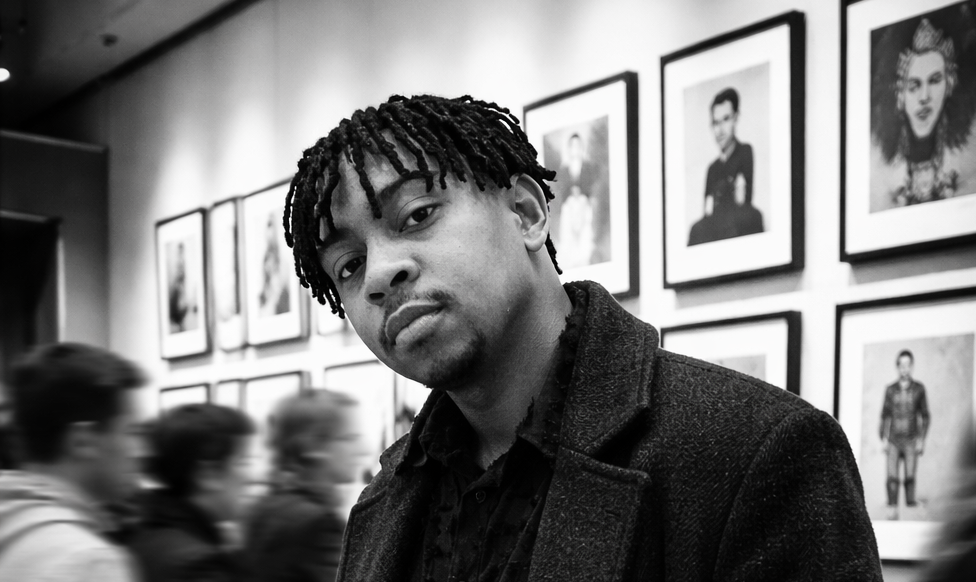
This prompt creates a dramatic black and white photograph of a person standing perfectly still inside a modern art gallery while the crowd around them blurs in motion. The result is a high-contrast, cinematic image that captures the feeling of calm confidence in the middle of chaos.
The subject is sharp and in focus wearing a dark textured overcoat, while the people around them dissolve into streaks of movement. The background features a clean gallery wall with framed street-art style pieces arranged in a grid. The overall aesthetic is moody, editorial, and looks like it was shot on film by a professional photographer.
Before You Start
You will need:
- A ChatGPT account (the free tier works for this prompt, no paid plan required)
- This prompt does not require a reference photo. It generates the subject from the description. If you want the subject to look like you, upload your face photo and add “Use my uploaded photo as the face reference and preserve my exact facial identity” at the start of the prompt
Good to know:
- ChatGPT produced the best result in my testing. Gemini struggled with this one
- Paste the prompt exactly as written. The specific photography language (50mm lens, shallow depth of field, film grain) is what drives the cinematic quality. Removing those details will flatten the output
- This prompt works well without a reference photo, but if you add one, place it in the same message as the prompt
- Try generating two to three versions. The motion blur effect varies slightly each time, and some outputs nail the stillness vs movement contrast better than others
| Field | Details |
| Prompt Type | Image Generation |
| Best Tool | ChatGPT (free tier) |
| Also Works On | Gemini (free tier, but results were noticeably weaker) |
| Difficulty | Beginner-friendly (copy and paste, no reference photo needed) |
| Customization | Outfit, gallery setting, artwork style, lighting mood, and subject pose can all be changed |
| Requires | No special requirements. Works without a reference photo. |
The Prompt
Create a high-contrast black and white cinematic photograph of a young man in a modern art gallery. He is standing still while a crowd moves around him, creating motion blur. The man is captured in a candid 'stolen shot' style, positioned at a slight angle—not fully facing the camera, but not completely in profile.
Frame him from mid-thigh upward (3/4 body shot). He is wearing a long, dark textured overcoat with his hands in his pockets, giving a calm, confident, introspective expression. He remains perfectly sharp and in focus, while the surrounding people are blurred in motion, emphasizing contrast between stillness and movement.
The background features a clean gallery wall filled with framed street-art style artworks arranged in a neat grid. The environment is minimal, modern, and softly lit.
Use dramatic lighting, deep shadows, and crisp highlights for a high-contrast monochrome aesthetic. Add subtle film grain for realism. Shot as if on a 50mm lens, shallow depth of field, professional gallery photography style, cinematic composition.
Copy this prompt and paste it directly into ChatGPT. No reference photo is needed unless you want the subject to look like you. If you do, upload your face photo in the same message and add facial identity instructions at the start of the prompt.
Why This Prompt Works
- The stillness vs motion contrast: The core creative concept here is telling the AI to keep one element sharp while blurring everything else. "He remains perfectly sharp and in focus, while the surrounding people are blurred in motion" gives the AI a clear visual rule to follow. This technique mimics long-exposure photography, where a slow shutter speed captures movement while a stationary subject stays crisp. AI models understand this concept from the millions of long-exposure photographs in their training data.
- The "stolen shot" framing: Describing the angle as a "candid stolen shot style, positioned at a slight angle" prevents the AI from generating a stiff, posed portrait. It pushes the output towards something that feels natural and unplanned, as if a street photographer caught the moment without the subject knowing. This small instruction makes a big difference in how authentic the result feels.
- Specifying the lens and depth of field: "Shot as if on a 50mm lens, shallow depth of field" tells the AI exactly how to handle focus and perspective. A 50mm lens is considered the closest to how the human eye sees, which is why it produces images that feel natural rather than distorted. Shallow depth of field means the background softens, drawing attention to the subject. These are not decorative words. They are technical instructions the AI model recognises and acts on.
- Film grain for realism: "Add subtle film grain" prevents the image from looking too digitally clean, which is one of the most common giveaways of AI-generated images. Real black and white photography has texture. Adding grain makes the output feel like it was shot on actual film, which strengthens the cinematic aesthetic.
- Describing the environment with purpose: "Clean gallery wall filled with framed street-art style artworks arranged in a neat grid" is not just background decoration. It creates visual geometry behind the subject. The orderly grid of artworks contrasts with the chaotic motion blur of the crowd, which reinforces the theme of stillness vs movement that runs through the entire image.
Tools I Tested This Prompt On
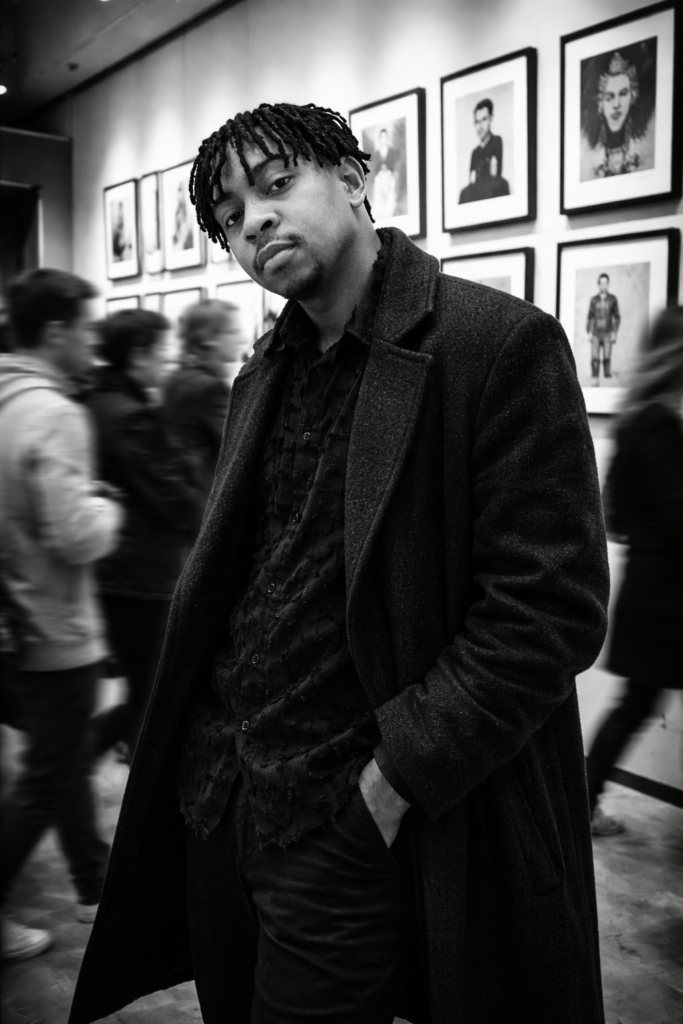
ChatGPT (free tier): ChatGPT handled this prompt exceptionally well. The motion blur on the surrounding crowd looked convincing, the subject remained sharp and well-defined, and the overall black and white contrast had genuine cinematic depth. The overcoat texture, the gallery environment, and the film grain all came through cleanly. This is the tool I would recommend for this prompt without hesitation.
Gemini (free tier): Gemini did not deliver a strong result with this prompt. The motion blur effect was inconsistent, and the overall image lacked the dramatic contrast and cinematic polish that makes this concept work. The gallery environment felt less defined, and the monochrome aesthetic was flatter compared to ChatGPT. I would not recommend Gemini for this particular prompt.
Verdict: ChatGPT on the free tier is the clear winner. The motion blur, contrast, and cinematic composition were all significantly stronger than what Gemini produced.
See the Results
Here is what this prompt produced when I tested it on both tools using the free tier. The same prompt with no reference photo was used for each.
ChatGPT (free tier):
How to Customise This Prompt
- Change the outfit: Replace "long, dark textured overcoat" with any clothing you prefer. "Fitted black turtleneck", "tailored grey suit with no tie", or "leather jacket over a plain white t-shirt" all work well with the moody aesthetic.
- Change the gallery artwork: Replace "street-art style artworks" with any art style. "Minimalist abstract paintings", "large black and white photographs", or "classical oil paintings in ornate frames" will each give the background a completely different character.
- Change the setting entirely: Replace the gallery with a different location. "A busy train station concourse", "a rainy city street at night", or "a crowded museum hall" all work with the motion blur concept. The key is keeping the contrast between a still subject and a moving environment.
- Make it a colour image: Remove "black and white" and "monochrome aesthetic" from the prompt. Replace with "rich, warm colour grading with muted tones" or "cool blue-tinted colour palette" to create a cinematic colour version instead.
- Add your own face: Add this line at the very beginning of the prompt: "Use my uploaded photo as the face reference and preserve my exact facial identity, including facial structure, jawline, nose shape, lips, eye shape, skin tone, and hairstyle exactly as they appear in my photo." Then upload your reference photo in the same message.
A Note on AI-Generated Images
Recommended tool: I found that ChatGPT produced the best result for this specific prompt, even on the free tier. That does not mean it will always be the best tool for every prompt. Different AI tools have different strengths, and results can vary depending on the version, server load, and time of generation.
Output variability: AI image generation is not perfectly consistent. Running the same prompt twice can produce slightly different results. The motion blur effect in particular will vary between generations. If your first output does not capture the stillness vs movement contrast cleanly, try generating again. Two to three attempts usually produces at least one strong version.
AI limitations with motion blur: Motion blur is one of the more complex effects for AI to render convincingly. In some outputs, the blur may look smeared rather than natural, or the subject may pick up slight softness despite the instructions. This is a known limitation. If the blur looks unnatural, try adding "long exposure photography style" to the prompt for a slightly different interpretation.
Usage: Before using AI-generated images commercially or publicly, check the terms of service of the tool you used. Policies on ownership, usage rights, and content restrictions vary between platforms.
Frequently Asked Questions About This Prompt
Do I need to upload a face photo for this prompt?
No. This prompt works without a reference photo. The AI will generate a subject based on the description in the prompt. If you want the person to look like you, you can add facial identity instructions at the start and upload your photo, but it is entirely optional.
Does this prompt work on the free tier of ChatGPT?
Yes. I tested this prompt on the free tier of ChatGPT and it produced an excellent result. No paid plan is required.
Why did Gemini not work well with this prompt?
Motion blur combined with high-contrast black and white photography is a technically complex image to generate. Gemini's image generation handled the individual elements (person, gallery, overcoat) adequately, but struggled to produce the dramatic contrast and convincing motion blur that make this concept work. ChatGPT's image model handled the combination significantly better.
Can I make this a colour image instead of black and white?
Yes. Remove "black and white" and "monochrome aesthetic" from the prompt and replace them with a colour description such as "rich, warm cinematic colour grading" or "cool desaturated tones." The rest of the prompt stays the same.
Can I change the setting from a gallery to somewhere else?
Absolutely. The motion blur concept works in any environment where there are people moving. Replace the gallery description with any busy location: a train station, a rainy street, a concert hall, a shopping arcade. Keep the instruction about the subject staying sharp while the crowd blurs, and the effect will translate.
Will the AI always get the motion blur right?
Not always. Motion blur is one of the harder effects for AI to render consistently. Some outputs will nail it, others may produce blur that looks more like smearing than natural movement. Generating two to three versions and picking the best one is the recommended approach.